Surfshark review: quiet at idle, but its kill switch slips at startup
The quietest VPN we've tested while idle, with no leaks in normal use. But the kill switch is off by default, our IP got out at startup, and uninstalling left an IPv6 block.
A light, quiet VPN that protects you well once connected. Turn the Kill Switch on, and know that it still let traffic out for about 8 seconds while Windows started. The optional antivirus works, but it is a second product with eight drivers and its own root certificate.
3.9 out of 5
From $2.49/mo
Test results
Version
Surfshark 6.21 (Surfshark One, 1 month)
Device
Windows 11 Pro (VirtualBox VM)
Tested from
EU connection
Last run
What it installs1 service, 2 drivers, 1 network adapterSurfshark Service (SYSTEM, starts with Windows), SharkDivert and OpenVPN DCO drivers, autostart entry for the app. A WireGuard service and adapter appear when you connect. No root certificates.
Memory and CPU while idle~580 MB RAMApp ~370 MB, service ~215 MB. The open window used about 290 s of CPU in 25 minutes in our VM.
Outside connections while idle (15 min, disconnected)Passed10, all to Surfshark or DNSSurfshark's servers via CDN77 and DNS-over-HTTPS to Cloudflare; the VPN service made none. No trackers.
Analytics or crash-report consentWatch outNever asked; crash reports onSettings → App settings → Send crash reports is on by default. The app bundles the Sentry error-reporting SDK.
Open portsPassedNone on the networkThe service listens only on 127.0.0.1; no inbound firewall rules
IP leakPassedNoneThree IP services saw the VPN address (New York)
DNS leakPassedNoneQueries went to Surfshark's DNS; Google and Akamai saw the VPN address
WebRTC (STUN) leakPassedNoneGoogle and Cloudflare STUN servers saw the VPN address
IPv6 leakNot testedOur test connection has no IPv6
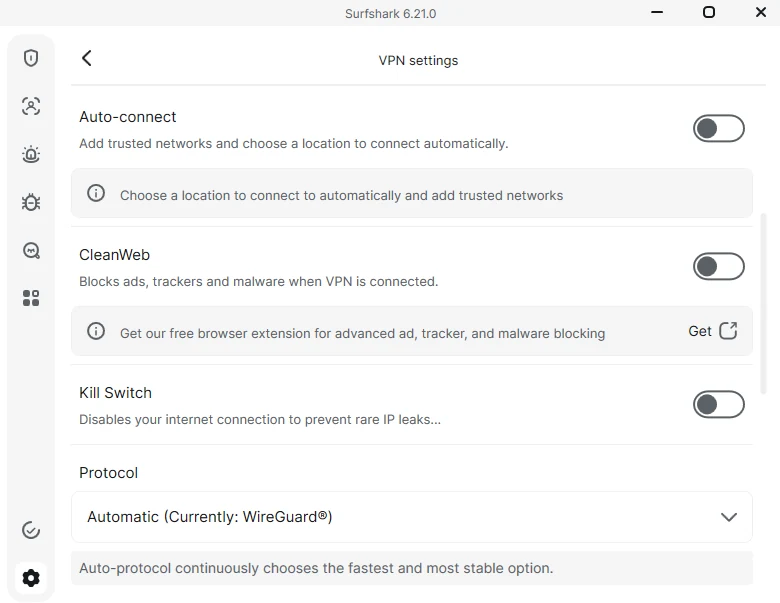
Kill switch defaultWatch outOff
Kill switch: network dropsPassedNo leakWith the kill switch off and on
Kill switch: VPN service crashesWatch outOff: leaked ~5 s. On: no leakOff: 10 requests with our real IP before the service restarted itself. On: blocked ~10 s, then reconnected.
Kill switch: app window killedPassedNo leakThe service kept the tunnel up
Restart of Windows (kill switch on)Watch outLeaked ~8 s14 of 368 requests returned our real IP before the tunnel came up; Windows services and Edge also got out
CleanWeb blocking (VPN on)13 of 22 ad and tracker domainsMissed doubleclick.net, Google Analytics, Facebook's tracker and Amazon ads; none of 7 phishing/malware test targets
Antivirus (Surfshark One)Caught EICAR; adds 8 drivers and a root certificateAvira Endpoint Protection SDK, downloaded on demand. Windows Defender switches off while it is installed.
Server locationsPassedMatch the appAll four New York exit addresses we saw are registered in New York
What it leaves after uninstallWatch outIPv6 block rules, dead startup entry, WireGuard driverThe antivirus, its drivers and the root certificate were removed. Internet came back within about a minute of the uninstaller finishing.
What works
Very quiet while idle: 10 connections in 15 minutes, all from the app window; the VPN service made none.
No IP, DNS or WebRTC (STUN) leaks; the servers we used were where the app said.
Opens nothing to the network: the service listens only on the computer itself.
With the Kill Switch on, a crashed VPN service leaked nothing and reconnected in about 10 seconds.
The optional antivirus caught and quarantined the EICAR test file and blocked its download.
What doesn't
Kill Switch is off after install; with it off, a crashed service leaked our real IP for about 5 seconds.
Even with the Kill Switch on, our real IP and several Windows apps reached the internet for about 8 seconds after a restart.
Crash reports to a third-party service are on by default, and the app never asks.
Uninstalling left two firewall rules that block all IPv6 traffic, plus a dead startup entry.
The antivirus is a separate ~200 MB Avira product with 8 drivers and a root certificate valid until 2066.
Who this is for
Surfshark suits people who want a VPN that stays out of the way: in our tests it was the quietest VPN app while idle, and it opened nothing to the network. Connected, it leaked nothing.
Its weak spot is what happens when something goes wrong. The Kill Switch is off by default. With it off, a crashed VPN service let our real IP out for about 5 seconds. With it on, a crash was handled cleanly, but a Windows restart still let our IP and several Windows apps out for about 8 seconds before the tunnel came up.
We tested Surfshark 6.21 on the Surfshark One plan (1 month), on 4 November 2026, on Windows 11 in a virtual machine on an EU internet connection. Surfshark is owned by Nord Security, the company behind NordVPN, and we ran both through the same tests.
What it installs
We took a full snapshot of the system before installing and after, and compared them. The installer came from Surfshark’s own download server through Windows Package Manager, with a verified hash, and is signed by Surfshark.
Installing added:
one Windows service, Surfshark Service, running as SYSTEM and starting with Windows;
two drivers: SharkDivert (Surfshark’s packet driver, used for split tunneling) and OpenVPN Data Channel Offload, plus an OpenVPN network adapter;
an autostart entry for the app;
a private copy of .NET inside the program folder, so nothing shared was added to Windows.
A WireGuard service and adapter appear when you connect. Files for a webcam-protection driver and Avira’s antivirus engine sit in the program folder but are not active until you turn those features on. Six root certificates appeared during installation; Windows’ event log shows Windows itself downloaded them.
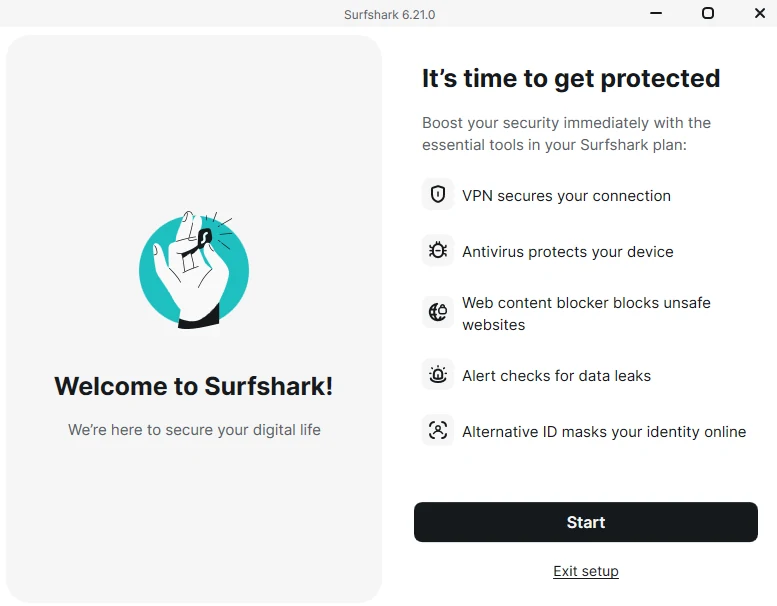
The first launch opens a setup screen with a large Start button that turns on the antivirus, web content blocker and other extras, and a small Exit setup link. We chose Exit setup.
First run: Start turns on all the extras; skipping them takes the small link underneath.
VPN settings after installation: Kill Switch, CleanWeb and auto-connect are all off.
Who it talks to
We logged every outgoing connection with Windows firewall auditing for 15 minutes while the app was open, signed in and disconnected.
There were 10 connections, all from the app window: five to Surfshark’s servers through the CDN77 network and five DNS-over-HTTPS lookups to Cloudflare. The VPN service made none. That is the quietest result we have recorded; NordVPN made 74 in the same test, Proton VPN one.
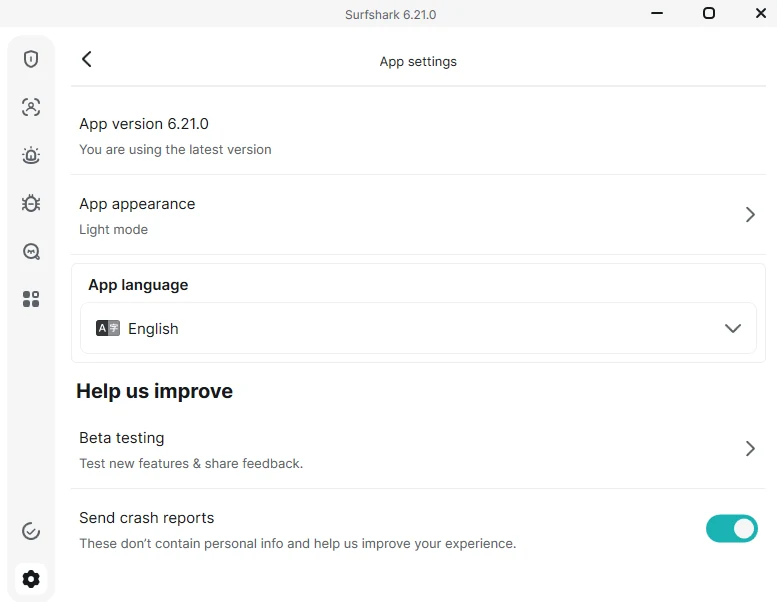
Surfshark never asked about analytics or crash reports. Under Settings → App settings, Send crash reports is on by default. The app bundles the Sentry error-reporting SDK, and its files sit in Surfshark’s data folders. We saw no connection to Sentry while idle, but a crash would be reported unless you switch it off.
Crash reports are on by default. There is no separate analytics switch.
The service listens only on the computer itself (127.0.0.1), and Surfshark adds no inbound firewall rules. We found neither our real IP nor any e-mail address in its log and settings files; the settings files are encrypted.
The app used about 580 MB of memory while idle, about 370 MB of it in the app window.
NordVPN 8.14.4990 MB
Surfshark 6.21 (VPN only)580 MB
Proton VPN 5.1.8550 MB
ZeroTier One 1.16.240 MB
Memory while idle, with each app open and signed in. Surfshark shown without its optional antivirus, which adds at least 230 MB.
Leaks
Connected to New York with default settings:
IP: three independent IP-check services all saw the VPN’s address, which is registered in New York.
DNS: Windows sent queries to Surfshark’s DNS servers, and both Google’s and Akamai’s resolvers saw a VPN address.
WebRTC: Google’s and Cloudflare’s STUN servers both saw the VPN address.
IPv6: our connection has no IPv6, so we could not test it.
No leaks.
Kill switch
We sent a request every 0.3–0.6 seconds for two minutes while breaking the connection, and counted any request that left with our real IP.
What we did
Kill switch off (default)
Kill switch on
Disabled the network for 15 s
No leak
No leak
Force-closed the app window
No leak
No leak
Force-killed the VPN service
Leaked ~5 s (10 requests), then reconnected
No leak; blocked ~10 s, then reconnected
Windows restart
n/a
Leaked ~8 s (14 requests) before the tunnel came up
What our probe saw when we killed the VPN service, with the Kill Switch off and on. Each mark is one request asking “what is my IP?”. Hover a mark for its time and answer. New York servers, 4 November 2026.
The service restarts itself after a crash, which keeps outages short. But with the kill switch off, traffic flows outside the tunnel until it does. Proton VPN’s default kill switch behaved the same way for about 9 seconds; NordVPN’s blocked everything (Proton VPN review, NordVPN review).
The restart test is the bigger issue. Auto-connect was off, but Surfshark reconnected to the last server by itself after Windows restarted. Before the tunnel was up, 14 requests left with our real IP over about 8 seconds, and Windows services, Edge’s WebView2, background downloads and Game Bar all reached the internet. NordVPN’s kill switch held through the same test.
CleanWeb
CleanWeb blocks ads, trackers and malicious sites while the VPN is connected. It is off by default. We checked the same list we used for NordVPN with the VPN connected, first with CleanWeb off and then on.
VPN connected
CleanWeb off
CleanWeb on
Ad domains blocked
0 of 12
6 of 12
Tracker domains blocked
0 of 10
7 of 10
Phishing and malware test domains, pages and file blocked
0 of 7
0 of 7
Ordinary sites still working
4 of 4
4 of 4
CleanWeb switches to filtering DNS servers and answers blocked names with 127.0.0.1. It missed doubleclick.net, Google Analytics, Facebook’s tracking script, AppNexus, Amazon’s ad server, Yahoo ads and Segment. NordVPN’s Basic-plan filter blocked 16 of the same 22.
The antivirus
Surfshark One includes an antivirus. Turning it on downloads and installs a separate ~200 MB program, Avira’s “Endpoint Protection SDK”, then runs a quick scan (5 minutes, 8,371 files in our VM).
It adds a lot to Windows:
three more services, two of them running as SYSTEM;
eight Avira drivers, including an Early Launch Anti-Malware driver that loads before most of Windows, real-time file filters and network filters; Windows’ firewall filter count rose from 576 to 799;
a root certificate, “Surfshark NetProtection Root 3”, in both the computer’s and the user’s trusted root stores, valid until 2066 with no restrictions;
at least 230 MB more memory for the antivirus service alone.
A root certificate lets software vouch for any website. We checked five sites (Google, GitHub, PayPal, Wikipedia, example.com) and all showed their real certificates, so it was not intercepting ordinary browsing. But when we fetched the EICAR test file over HTTPS, the antivirus answered the secure connection itself with a “Malicious website ahead!” page, which it can only do with that certificate.
Windows Defender switched itself off while Surfshark’s antivirus was installed, which is normal when another antivirus registers. The antivirus caught the EICAR test file when it was opened and quarantined it within about 2 seconds, and blocked the download.
What it leaves behind
We uninstalled Surfshark the normal way, with the Kill Switch on and the antivirus installed. The uninstaller ran for 17 seconds and removed the app, the antivirus, all eight Avira drivers and the root certificate. Windows Defender turned itself back on. The internet came back within about a minute of the uninstaller finishing.
Left behind:
two firewall rules, “Surfshark Block All IPv6”, inbound and outbound, which keep blocking all IPv6 traffic on the computer;
a startup entry pointing to the deleted Surfshark program;
the WireGuard network driver.
If you uninstall Surfshark, delete the two firewall rules in Windows Defender Firewall’s advanced settings, or IPv6 stays off.
Server locations
Every exit address we saw while connected to “New York” (four in total, on Datacamp and M247 networks) is registered in New York.
Company, audits and price
These facts come from public sources and are not test results.
Surfshark operates out of the Netherlands, which belongs to the Nine Eyes intelligence-sharing group, so Dutch authorities can legally request data (Security.org). It merged with Nord Security, the company behind NordVPN, in 2022, while keeping a separate brand (ProxyHorizon).
Deloitte verified Surfshark’s no-logs statement again in a report published in June 2025, following an earlier Deloitte review in January 2023. The assessment covered standard, static and multiport servers and their configuration, under ISAE 3000. Customers can read the report in their Surfshark account (Surfshark).
Plan
Listed price, 2-year plan
Listed renewal
Starter
$2.49/month
$79/year
One
$2.79/month
$99/year
One+
$4.49/month
$119/year
Prices as captured on 27 September 2026, with the first term running 27 months. All plans allow unlimited devices on one account, cut to 3 during a free trial, and include a 30-day money-back guarantee (ProxyHorizon).
The monthly plan we bought cost €19.95 for Surfshark One (EU price, 4 November 2026).
How to set it up safely
Install from surfshark.com or with winget install Surfshark.Surfshark.
In Settings → VPN settings, turn on Kill Switch.
In Settings → App settings, decide whether to keep Send crash reports on.
If you turn on the antivirus, know that it installs Avira’s engine, eight drivers and a root certificate.