Reviews / VPN
NordVPN review: what the app installs, who it talks to, and whether it leaks
No leaks in any test and the strongest kill switch we have tested. But it runs three always-on services, uses about 1 GB of memory and keeps calling its analytics server after you click Reject.
Verdict
Very good at protecting your connection: nothing leaked in normal use, after crashes or during a restart, and the uninstall is nearly spotless. It is also the heaviest app we have tested, and its privacy choices are narrower than the consent screen suggests. Turn on the Internet Kill Switch; it is off by default.
From $3.49/mo
Test results
- Version
- NordVPN 8.14.4.0 (paid plan)
- Device
- Windows 11 Pro (VirtualBox VM)
- Tested from
- EU connection
- Last run
- What it installs3 services, 3 drivers, 2 network adapters, .NET 8 + VC++ runtimesnordvpn-service, Threat Protection service and NordUpdater, all running as SYSTEM from boot. NDivert packet driver, WireGuard, OpenVPN DCO. No startup tasks or root certificates.
- Memory and CPU while idleFailed~990 MB RAMApp window ~470–530 MB, VPN service ~270 MB, Threat Protection ~145 MB, updater ~68 MB. The open window used 180–220 s of CPU per 15 min in our VM, about 35 s when in the background.
- Outside connections while idle (15 min, disconnected)74, all to Nord or DNSNord API via CDN77, DNS-over-HTTPS to Cloudflare 1.1.1.1, Nord's DNS, 3 calls to applytics.nordvpn.com. No third-party trackers.
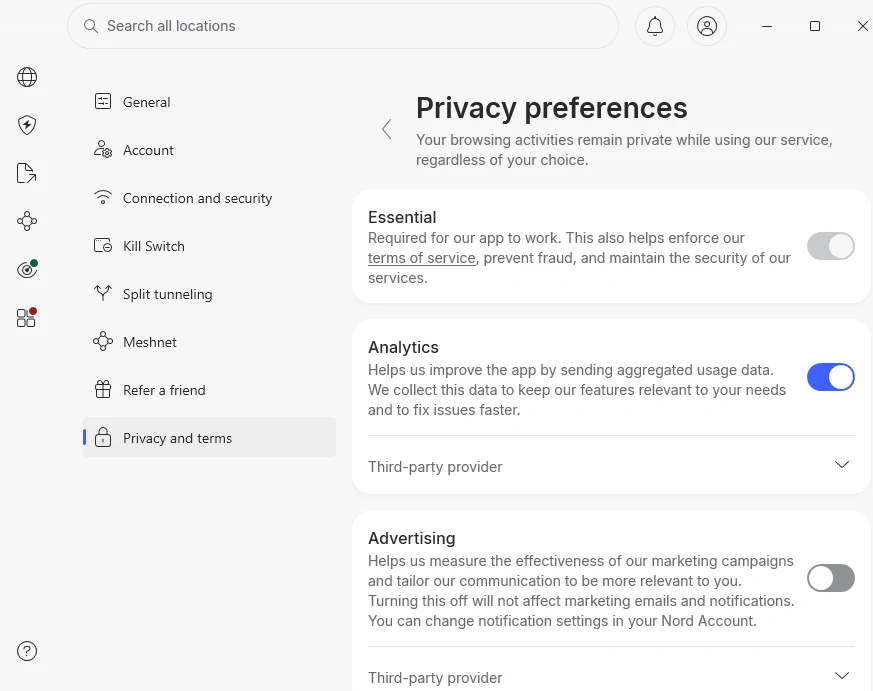
- Analytics rejected vs acceptedFailedNo difference at idle74 connections and 3 calls to applytics.nordvpn.com in both 15-minute runs. Nord lists an always-on 'Essential' data category.
- Advertising tracker (Braze)PassedNot contactedAdvertising stayed off after Reject
- IP leakPassedNoneThree IP services saw the VPN address
- DNS leakPassedNoneQueries went to Nord's DNS servers; Google's resolver saw the VPN address
- WebRTC (STUN) leakPassedNoneCloudflare's STUN server saw the VPN address; Google's did not answer
- IPv6 leakNot testedOur test connection has no IPv6
- Kill switch defaultFailedOff
- Kill switch: network dropsPassedNo leakWith the kill switch off and on
- Kill switch: VPN service crashesPassedNo leakOff: internet blocked until the service was restarted by hand. On: blocked ~20 s, then the service restarted and reconnected.
- Kill switch: app window killedPassedNo leakThe service kept the tunnel up
- Restart of Windows (kill switch on)PassedNo leak211 of 211 requests blocked in the first 3 minutes; only NordVPN itself reached its servers
- Server locationsPassedMatch Nord's own listUS (New York) and Japan (Tokyo) are physical; 'Pakistan' exits in Singapore and 'Kenya' in Frankfurt, as Nord discloses
- What it leaves after uninstallWireGuard and OpenVPN DCO driversPlus the shared .NET 8 and Visual C++ runtimes. All Nord folders, settings, services and firewall rules removed.
What works
- No IP, DNS or WebRTC (STUN) leak on any test.
- With the Internet Kill Switch on, nothing leaked when we cut the network, killed the VPN service or restarted Windows, and the service restarted itself.
- Even with the kill switch off, killing the VPN service blocked traffic instead of leaking it.
- Uninstall removed everything of its own, including all its firewall filters, and gave the internet back with the kill switch still on.
- Virtual locations are disclosed by Nord, and the servers we checked sit where Nord says.
What doesn't
- Kill switch is off after install.
- Installs three services that run as SYSTEM from boot, including Threat Protection and an updater, even with Threat Protection switched off.
- Uses about 990 MB of memory while idle, and the open app window kept one CPU core about 20% busy in our VM.
- Rejecting analytics did not change what it sends while idle: it contacted applytics.nordvpn.com equally often either way.
- The consent screen highlights Accept and shows Reject as a secondary button.
Who this is for
NordVPN suits people who want a VPN that does not leak, even when something goes wrong. Across two days of tests, on 28 October and 3 November 2026, nothing left our computer outside the tunnel: not when we cut the network, not when we killed the VPN service, and not during a Windows restart with the kill switch on.
The price is weight. NordVPN installs more than any app we have tested so far, runs three background services from boot, and uses about 1 GB of memory while idle. If you want a light VPN, look elsewhere; if you want one that fails safe, this is a strong choice.
Turn on the Internet Kill Switch after installing. It is off by default.
We tested NordVPN 8.14.4.0 on a paid subscription, on Windows 11 in a virtual machine on an EU internet connection. Threat Protection (ad and malware blocking), Meshnet and the refund process are not covered yet.
What it installs
We took a full snapshot of the system before installing and after, and compared them. The installer came from Nord’s own download server through Windows Package Manager, with a verified hash. Nord’s programs are signed by Nord Security.
Installing added:
- three Windows services, all running as SYSTEM and starting with Windows: the VPN service, a Threat Protection service and a separate NordUpdater service. Threat Protection is switched off in the app’s settings, but its service still runs;
- three drivers: NDivert (Nord’s own packet-filtering driver), WireGuard (for the NordLynx protocol) and OpenVPN Data Channel Offload;
- two network adapters, NordLynx and OpenVPN;
- the Microsoft .NET 8 Desktop Runtime and Visual C++ 2022 runtime, which the installer needs;
- one inbound firewall rule for Meshnet, which is off by default.
No startup tasks or browser extensions. Four root certificates appeared during installation, but Windows’ event log shows Windows itself downloaded them.
The default settings after signing in: the kill switch is off, NordVPN starts with Windows, auto-connect is off, Threat Protection is off, and Dark Web Monitor (which checks your account e-mail against known leaks) is on.
Who it talks to, and what “Reject” changes
The first time you sign in, NordVPN asks about data collection.
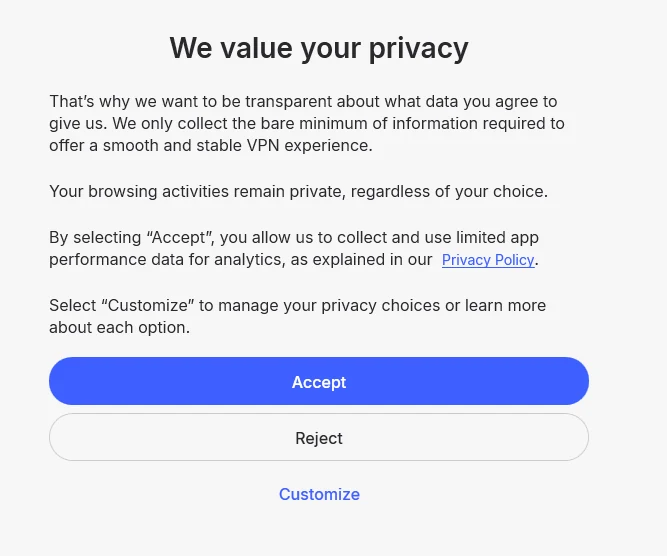
We clicked Reject, then logged every outgoing connection with Windows firewall auditing for 15 minutes while the app was open and disconnected. Then we switched Analytics on and repeated the run.
| 15 minutes idle, disconnected | Analytics rejected | Analytics accepted |
|---|---|---|
| All connections by NordVPN | 74 | 74 |
| Nord’s API (through the CDN77 network) | 18 | 18 |
| DNS-over-HTTPS to Cloudflare (1.1.1.1) | 30 | 33 |
| applytics.nordvpn.com | 3 | 3 |
| SmartBear Insight Hub (Nord’s analytics provider) | 0 | 0 |
| Braze (Nord’s marketing provider) | 0 | 0 |
The rest were ordinary DNS lookups, internal checks of the disconnected tunnel and, in the first run, one call to an unidentified address on Cloudflare’s network.
Two things stand out:
- Rejecting analytics did not change what NordVPN sends while idle. In both runs it contacted
applytics.nordvpn.com, a Nord server whose name suggests analytics, three times. The traffic is encrypted, so we cannot see what was sent. Nord’s privacy settings list an Essential category that cannot be switched off; this is the likely explanation. - No third-party trackers. We saw no connections to Braze, Nord’s advertising provider, and none to SmartBear, its analytics provider. SmartBear is an error-reporting service, so with nothing failing there may simply have been nothing to send.
NordVPN resolves its own server names over encrypted DNS (DNS-over-HTTPS to Cloudflare), so the names do not show up in Windows’ DNS cache. We matched them by resolving the hostnames listed in the app’s own files.
Memory and CPU. NordVPN used about 990 MB of memory while idle across four processes: the app window (470–530 MB), the VPN service (about 270 MB), Threat Protection (about 145 MB) and the updater (about 68 MB). With its window open, the app used 180–220 seconds of CPU time per 15 minutes in our virtual machine, which has no graphics acceleration. On a normal PC this is likely lower. In the background it used about 35 seconds.
Leaks
Connected to a US server with default settings:
- IP: three independent IP-check services all saw the VPN’s address.
- DNS: Windows sent queries to Nord’s DNS servers, and Google’s resolver saw a VPN address.
- WebRTC: Cloudflare’s STUN server saw the VPN address; Google’s STUN server did not answer through the tunnel.
- IPv6: our connection has no IPv6, so we could not test it.
No leaks.
Kill switch
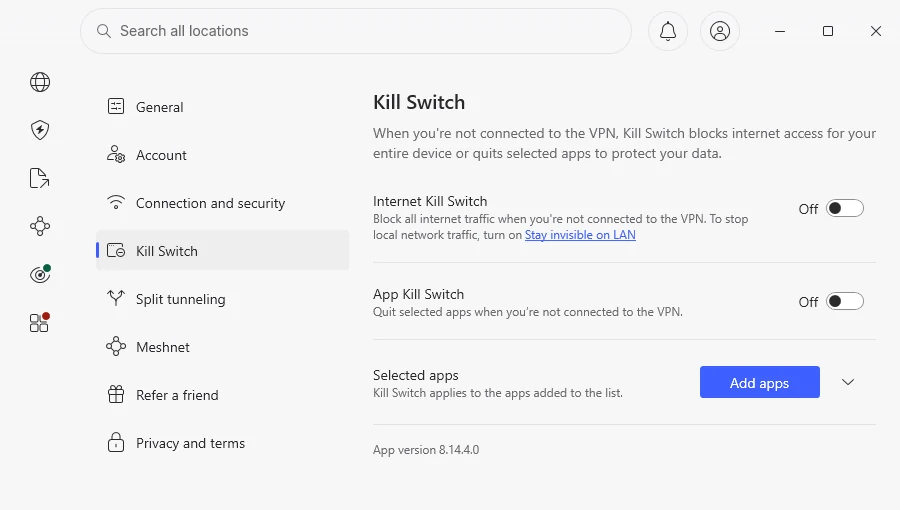
NordVPN’s Internet Kill Switch blocks all internet traffic whenever the VPN is not connected, not just when a connection drops. We sent a request every 0.3–0.6 seconds for two minutes while breaking the connection, and counted any request that left with our real IP.
| What we did | Kill switch off (default) | Kill switch on |
|---|---|---|
| Disabled the network for 15 s | No leak | No leak |
| Force-killed the VPN service | No leak; internet blocked until we restarted the service | No leak; service back in ~20 s, VPN reconnected |
| Force-closed the app window | No leak | No leak |
| VPN disconnected | Internet works (by design) | Internet blocked; local network still reachable |
| Windows restart | n/a (auto-connect off) | No leak: 211 of 211 requests blocked in the first 3 minutes |
This is the best result we have recorded. Even with the kill switch off, a crashed service blocked traffic instead of leaking it. In the same test, Proton VPN’s default kill switch leaked for about 9 seconds (our Proton VPN review).
The catch: with the kill switch off, the internet stayed blocked until we restarted the service by hand. Most people would reboot.
During the restart test, the only programs that reached the internet before the tunnel was up were NordVPN’s own app and service, talking to Nord’s servers. Windows, Edge and everything else stayed blocked.
Server locations
We connected to four locations and checked where each exit address is registered. We also timed connections through the tunnel; our own connection is in the EU.
| Location in the app | Exit address registered in | Round trip through the tunnel |
|---|---|---|
| United States | New York, US | 150 ms |
| Japan | Tokyo, Japan | 287 ms |
| Pakistan | Singapore | 226–247 ms |
| Kenya | Frankfurt, Germany | 83 ms |
The latencies fit the registered locations. Pakistan and Kenya are virtual locations: Nord publishes a list that places Pakistan’s servers in Singapore and Kenya’s in Germany (NordVPN), and our results match it. Websites will see a Singapore or German address, not a Pakistani or Kenyan one, so a virtual location will not help with services that require a local IP.
What it leaves behind
The uninstaller ran for 19 seconds and also removed NordUpdater. It gave the internet back even though the kill switch was still on, and removed every Windows Filtering Platform rule that mentioned Nord (95 entries), plus its services, adapters, folders and registry keys.
Left behind:
- the WireGuard and OpenVPN DCO network drivers, still registered in Windows;
- the .NET 8 Desktop Runtime and Visual C++ runtimes, which other programs may also use.
Company, audits and price
These facts come from public sources and are not test results.
NordVPN is developed by Nord Security and is incorporated in Panama, with offices in Lithuania, the United Kingdom, Panama and the Netherlands (Wikipedia). Surfshark merged with Nord Security in 2022, though the two brands run separately (ProxyHorizon).
Audits
Deloitte Lithuania carried out NordVPN’s sixth independent no-logs assurance engagement between 10 November and 12 December 2025, under the ISAE 3000 (Revised) standard. It covered standard, Double VPN, obfuscated and Onion Over VPN servers, and concluded that systems were set up in line with the no-logs statement. The full report is available only to customers in their Nord Account (NordVPN).
History worth knowing:
- A server in a contracted Finnish data center was accessed by an attacker between January and March 2018. NordVPN disclosed it publicly only in October 2019 and was criticised for the delay (Wikipedia).
- NordVPN has published transparency reports since October 2024, and fully left the Russian market in 2024 (Wikipedia).
| Plan | 2-year plan | 1-year plan | Monthly |
|---|---|---|---|
| Basic | $3.49/month | $5.49/month | $14.99 |
| Complete | $4.49/month | $6.49/month | $19.99 |
| Prime (US) | $7.49/month | $9.49/month | $29.99 |
US prices as reported in June 2026 (Tom’s Guide). Nord changes prices often, so check the checkout page. Every plan has a 30-day money-back guarantee and covers 10 devices.
How to set it up safely
- Install from nordvpn.com or with
winget install NordSecurity.NordVPN. - On first launch, click Reject on the consent screen, or Customize to see the categories.
- Go to Settings → Kill Switch and turn on Internet Kill Switch.
There is no setting to stop the Threat Protection service if you don’t use the feature; it keeps running in the background.