Reviews / Networking
ZeroTier review: what it installs, who it talks to, and what it leaves behind
Light, well-behaved and safe by default while installed. But uninstalling leaves the device's private key, network settings, a driver and two allow-all firewall rules behind.
Verdict
A good, lightweight way to put your own devices on one private network, and it keeps new networks in Windows' locked-down Public mode. It is not a privacy VPN: it doesn't hide your IP. If you stop using it, clean up by hand after uninstalling.
From Free (10 devices)
Test results
- Version
- ZeroTier One 1.16.2 (free Personal plan)
- Device
- Windows 11 Pro (VirtualBox VM)
- Tested from
- EU connection
- Last run
- What it installs1 service, 1 virtual network driver, 5 firewall rulesService runs as SYSTEM and starts with Windows. Adapter and driver appear only when you join a network. No startup tasks or root certificates.
- Memory and CPU while idlePassed~40 MB RAM; 4 s CPU in 15 minService 16 MB, tray app 24 MB
- Outside connections while idle (15 min)101, all to ZeroTier infrastructureRoot servers in Los Angeles, Miami, Tokyo and Zürich plus one ZeroTier HTTPS service; no network joined
- Analytics or trackersPassedNone
- Asks the router to open a portYes (NAT-PMP)Standard for peer-to-peer tools; helps direct connections
- Inbound firewall rules at install3, on all profiles incl. Public
- Management API reachable from the networkPassedNoListens on all addresses but refuses non-local requests, even with the right key
- Secret keys readable by other usersPassedNoAdministrators and SYSTEM only
- Windows network type after joiningPassedPublicFile sharing stays closed; members can ping the device
- Routes internet traffic through ZeroTierNoPublic IP unchanged; only the private network's addresses use the tunnel
- What it leaves after uninstallFailedPrivate key, network config, driver, 2 allow-all firewall rulesPlus a copy of the API key in the user profile
What works
- Uses about 40 MB of memory and almost no CPU, roughly a tenth of a typical VPN app.
- No analytics or trackers: every connection we logged went to ZeroTier's own servers.
- A newly joined network is set to Windows' Public profile, so file sharing stays closed to other members.
- The management API answers only on the computer itself, even with a valid key.
- Free plan covers 10 devices and 10 users.
What doesn't
- Uninstall leaves the device's private key and network configuration on disk.
- Also leaves the virtual network driver and two firewall rules that allow all traffic for a program that no longer exists.
- Talks to ZeroTier's servers around the clock, even when you haven't joined any network.
- Opens inbound firewall rules on all network types, including Public, at install.
- Asks your router to open a port for it (NAT-PMP) without telling you.
Who this is for
ZeroTier puts your computers, servers and phones on one private network wherever they are, as if they were plugged into the same office switch. People use it to reach a home server, a NAS or a remote desktop without opening ports, and small teams use it instead of a traditional company VPN.
It is not a privacy VPN. It doesn’t hide your IP address or route your browsing through another country; in our test, joining a network left our public IP unchanged. If that’s what you want, see our VPN reviews.
We tested ZeroTier One 1.16.2 on the free plan on 28 October 2026, in a Windows 11 virtual machine on an EU internet connection.
What it installs
We took a full snapshot of the system before installing and after, and compared them. The installer came from ZeroTier’s own download server through Windows Package Manager, with a verified hash, and its programs are signed by ZeroTier, Inc. of Irvine, California.
Installing added:
- ZeroTierOneService, a Windows service that runs as SYSTEM and starts with Windows;
- the tray app and its folders in
Program Files (x86)\ZeroTierandProgramData\ZeroTier; - five firewall rules, three of them allowing incoming traffic on every network type, including Public;
- the zttap300 virtual network driver, which is loaded and gets an adapter only once you join a network.
No startup tasks, browser extensions or root certificates. A new root certificate did appear during install, but Windows’ event log shows Windows itself downloaded it to check a signature.
It is very light: about 40 MB of memory for the service and tray app together, and under 4 seconds of CPU time in 15 minutes.
Who it talks to
We logged every outgoing connection with Windows firewall auditing for 15 minutes, with ZeroTier installed but not joined to any network.
The service made 101 connections:
- to ZeroTier’s root servers in Los Angeles, Miami, Tokyo and Zürich, over both IPv4 and IPv6 (these help devices find each other);
- to one ZeroTier HTTPS service,
global-anycast-core-svc.zerotier.com; - to our router, asking it to open a port (NAT-PMP), which helps devices connect directly.
Everything went to ZeroTier’s own infrastructure, hosted at rented data centres. We saw no analytics or advertising. The service stays in touch with those servers all the time, even before you join a network.
Is your computer exposed
This is the question that matters for a tool that connects you to other people’s devices.
- Management API. ZeroTier’s control interface listens on port 9993 on all network addresses. We sent it requests from the machine’s network address, with and without the correct key, and it refused both. Only programs on the computer itself can control it.
- Secret keys. The device’s private key and API keys can be read only by administrators and the system.
- Network type. After joining, Windows put the ZeroTier network in its Public profile, where file and printer sharing stay closed. ZeroTier adds one rule so other members can ping you. If you switch the network to Private in Windows, your shared folders become visible to every member, so think twice before doing that on a network you share.
- Internet traffic. Joining a network did not change our public IP. ZeroTier added a placeholder default route with a very low priority, which Windows needs to classify the network; no traffic used it.
What it leaves behind
The uninstaller finished in 7 seconds and removed the service, the adapter and most firewall rules. It left more than any app we have tested so far:
- the device’s private key (
identity.secret) and API keys inC:\ProgramData\ZeroTier\One; - the configuration of the network we had joined, and the list of servers it had talked to;
- a copy of the API key in the user’s
AppData\Local\ZeroTier; - two command-line helper files in
Program Files (x86); - the zttap300 driver, still registered in Windows;
- two firewall rules, inbound and outbound, allowing all traffic for
zerotier-one_x64.exe, a program that no longer exists.
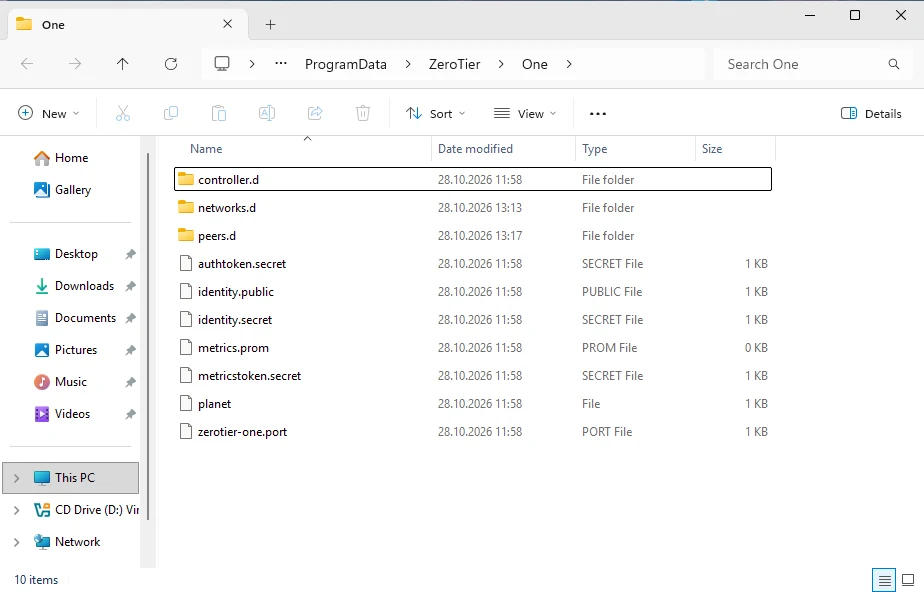
C:\ProgramData\ZeroTier\One still holds the device's private key (identity.secret), the API keys and the joined network's settings. Our test VM, 28 October 2026.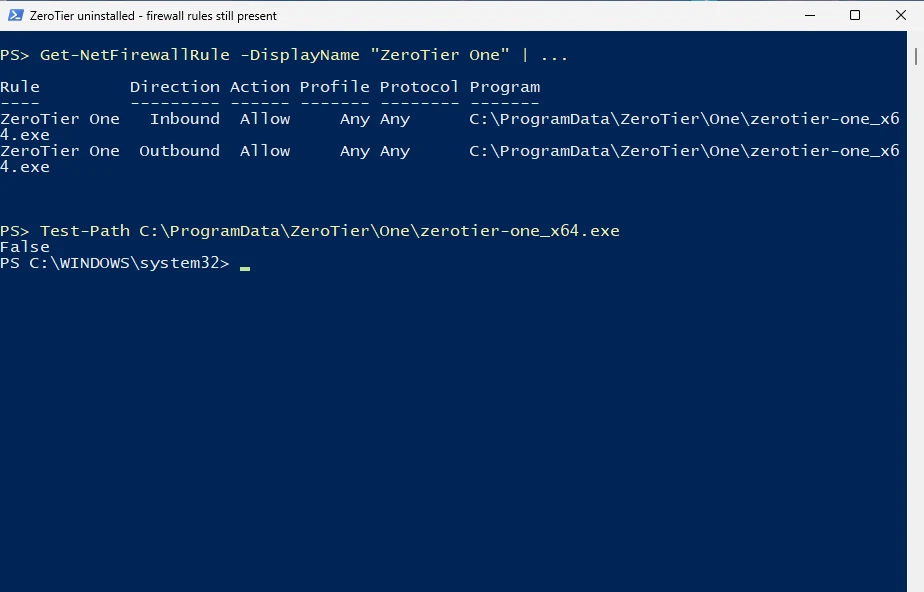
Only administrators can write to that folder, so the leftover rules are a tidiness problem rather than an open door. The key matters more: if you reinstall, the computer comes back as the same device. If you uninstall for good, remove the device from your network in ZeroTier Central too.
Price
| Plan | Price | Devices | Networks |
|---|---|---|---|
| Personal | Free | 10 | 1 |
| Essential | $18/month | 10 included, then $2 each | 10 |
| Scale | $179/month | 100 included, then $1.80 each | Unlimited |
Prices and limits effective 20 October 2026, from ZeroTier. The free plan has community support only and no API access. ZeroTier’s code is published under the Business Source License 1.1, which lets you read it but restricts some commercial uses.
How to remove it completely
- In ZeroTier Central, delete the device from your network.
- Uninstall ZeroTier One from Windows Settings.
- Delete
C:\ProgramData\ZeroTier,C:\Program Files (x86)\ZeroTierand%LOCALAPPDATA%\ZeroTier. - In Windows Defender Firewall’s advanced settings, delete the two rules named ZeroTier One.
- As administrator, run
pnputil /enum-drivers, find the entry forzttap300.inf, and delete it withpnputil /delete-driver oemN.inf /uninstallusing the number shown.